deploy
Deploy a trained model artifact to the inference engine.
What it does
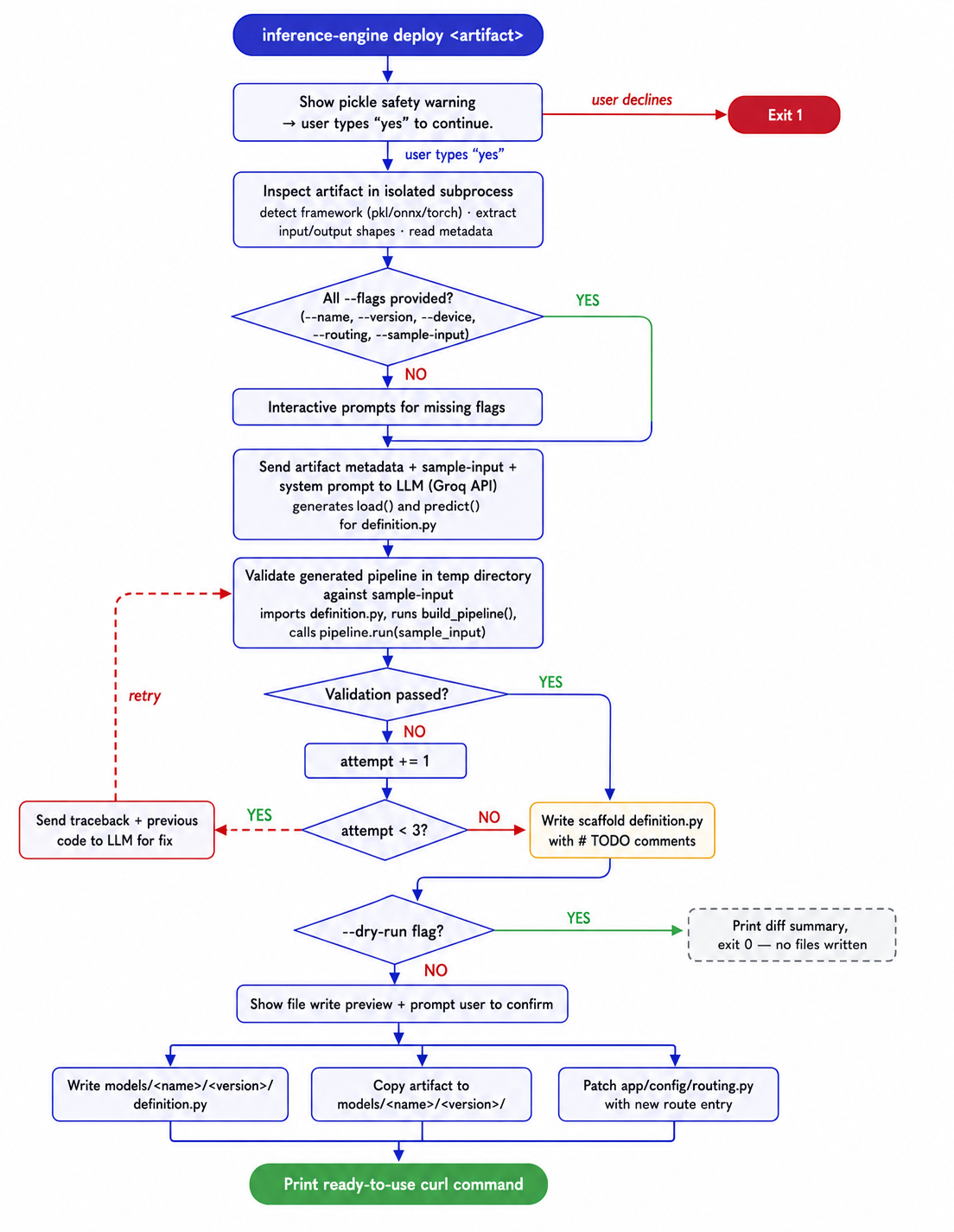
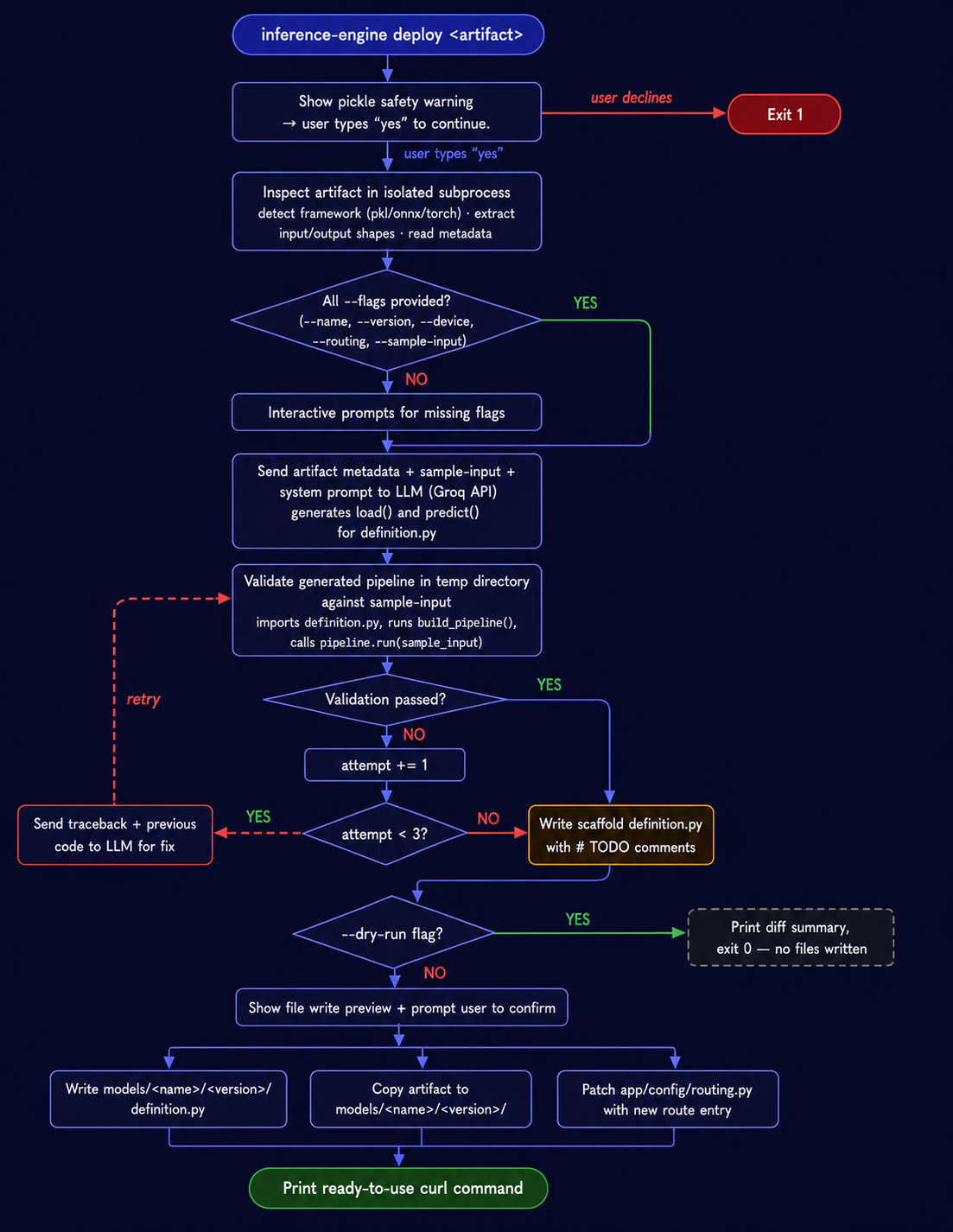
- Inspects the artifact in an isolated subprocess — detects format from extension and magic bytes, routes to a format-specific extractor, returns structured metadata
- Prompts for name, version, device, routing strategy, and sample input
- Auto-increments version by scanning
models/<name>/for existing versions - Shows a preview of files to be written
- In
--dry-runmode, exits here — no LLM call, no files written - Calls the LLM to generate
load()andpredict()method bodies using per-framework prompt templates - Validates the generated pipeline against the sample input in a temp directory
- Retries up to 3 times on failure, sending the traceback back to the LLM each time
- If all retries fail, writes a scaffold
definition.pywith# TODOcomments instead of exiting with an error - Asks for confirmation, then writes
models/<name>/<version>/definition.py, copies the artifact, patchesapp/config/routing.py - Prints a ready-to-use
curlcommand
Options
| Flag | Default | Description |
|---|---|---|
--name |
derived from filename | Model name |
--version |
auto-incremented | Version string |
--device |
cpu |
cpu or gpu |
--routing |
static |
static, canary, or ab |
--sample-input |
prompted | Sample input for validation |
--dry-run |
off | Show preview and exit — no LLM call, no files written |
When all flags are provided, all interactive prompts are skipped (CI-safe).
Examples
Interactive:
Non-interactive (CI):
inference-engine deploy ./sentiment.pkl \
  --name sentiment --version v1 \
  --device cpu --routing static \
  --sample-input "this movie was great"
Dry run — inspect and preview without calling the LLM or writing anything:
inference-engine deploy ./sentiment.pkl --dry-run \
  --name sentiment --version v1 \
  --device cpu --routing static \
  --sample-input "great movie"
File output
models/
└── <name>/
    └── <version>/
        ├── definition.py     ← generated (or scaffold if generation failed)
        └── <artifact>        ← copied here
app/config/routing.py is patched to add the model's routing entry.
Re-running with the same name/version overwrites files and replaces the routing entry — no duplicates.
Scaffold fallback
When the LLM cannot produce a passing pipeline after 3 attempts, a scaffold is written instead of failing:
Scaffold written. Complete the TODOs before deploying.
  models/<name>/<version>/definition.py  [scaffold — fill in load() and predict()]
The scaffold is valid Python that imports correctly but raises NotImplementedError at runtime until the # TODO sections are filled in. The artifact is still copied and routing is still patched.
Routing strategies
| Strategy | What gets written |
|---|---|
static |
Always routes to the deployed version |
canary |
10% to new version, 90% to primary — edit routing.py to adjust |
ab |
100% weight on new version via A/B dict — edit routing.py to adjust |
Supported formats and frameworks
Format is detected from file extension and magic bytes before any loading attempt.
| Format / Extension | Extractor | Load strategy | Metadata extracted |
|---|---|---|---|
.pkl, .pickle |
PickleExtractor | joblib.load → pickle.load |
class name, pipeline steps, feature count, class labels |
.joblib |
PickleExtractor | joblib.load |
same as pickle |
.pt, .pth |
TorchExtractor | torch.load(..., weights_only=True) |
state dict keys (up to 30), param count, or layer names |
.onnx |
OnnxExtractor | onnx.load |
opset, op types, inputs/outputs with dynamic axes |
.safetensors |
SafetensorsExtractor | header-only read | tensor keys, shapes, metadata |
| directory | DirectoryExtractor | JSON reads only | config.json fields, tokenizer class, PEFT adapter flag |
| unknown | GenericExtractor | joblib.load → pickle.load |
class name, errors recorded |
Framework detection (sklearn, PyTorch, Transformers, XGBoost, LightGBM, CatBoost, sentence-transformers) runs as a second pass for pickle-loaded objects.
All framework libraries use lazy imports — none are required dependencies. The inspector runs in an isolated subprocess and always exits 0; extraction errors are recorded in metadata rather than crashing the deploy pipeline.
Note on server reload
deploy patches app/config/routing.py. If the server is running with --reload,
this will trigger a hot-reload. Deploy while the server is stopped, or use --dry-run
to validate first, then deploy and restart.