Production Deployment
Environment
Required for production:
ENV=production
API_KEYS=key1:tenant_a:predict,read_models;key2:tenant_b:predict,read_models,admin
DATABASE_URL=postgresql://user:password@127.0.0.1:5432/inference_engine
REDIS_URL=redis://localhost:6379/0
When ENV=production and API_KEYS is not set, the server refuses to start.
When DATABASE_URL or REDIS_URL is set but the service is unreachable, the server (and arq worker) refuse to start with a clear error instead of silently falling back to SQLite or in-process async. Ensure both services are healthy before starting the application.
Start services
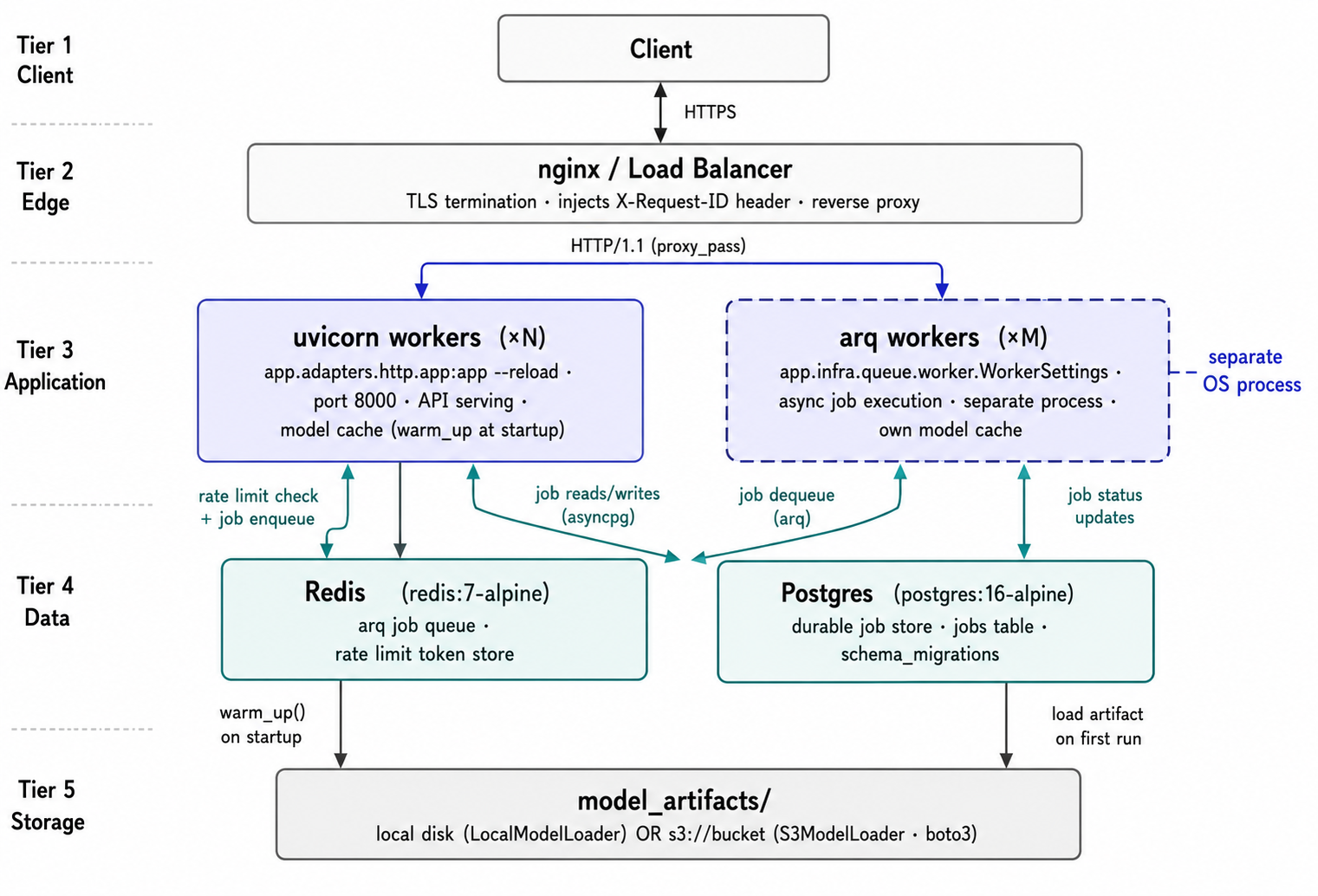
Or manually:
# 1. Start Postgres + Redis
docker compose up -d

# 2. Start arq worker
arq app.infra.queue.worker.WorkerSettings &

# 3. Start API server
uvicorn app.adapters.http.app:app --host 0.0.0.0 --port 8000 --workers 4
Reverse proxy
Run behind nginx or a load balancer for TLS termination. Example nginx config:
Passing X-Request-ID enables deterministic A/B routing and request correlation in logs.
Security checklist
- [ ]
ENV=production - [ ]
API_KEYSset with strong randomly generated keys - [ ] TLS-terminating reverse proxy in front
- [ ]
/metricsand/debug/*restricted to internal networks - [ ] Redis-backed rate limiting (
REDIS_URLset)
Scaling
- API server: run multiple uvicorn workers or processes. Rate limiting requires
REDIS_URLfor cross-process accuracy. - arq worker: run multiple worker processes. Each worker initialises its own model registry.
- Model registry:
max_loadedlimits memory usage when many models are registered.
SLA timeouts
Configure per-model timeout budgets in app/config/sla.py: